The Agent Is the State: UIs That Keep Nothing
Today I was clicking around the management console in the VTA browser plugin when Glenn Gore, who has written most of the Verifiable Trust Infrastructure, mentioned something in passing. Every click I was making was executing a trust task against my agent. There was no state being kept in the browser. The plugin only caches the page I am looking at.
In retrospect it was obvious. Put that way, it was also kind of mind-blowing. This post is an attempt to explain why, because unless you have used all of this it is hard to see what has actually been built.
The usual way, and its usual problems
A conventional web front end is a state machine that happens to render. It fetches data, keeps a copy in a store, and renders from the copy. A click updates the copy, fires a request, and reconciles when the server answers. Somewhere in there is a cache with an invalidation policy, a sync layer for the other tabs and devices, an optimistic update path for when the network is slow, and a rollback path for when the server disagrees.
Every one of those is a place where the front end can be wrong about the world. Two copies of the truth drift. A token cached in local storage outlives the permission it stood for. A user sees a button they can no longer use, because the client decided what they were allowed to do from something it remembered rather than something it asked.
None of this is bad engineering. It is what you have to build when the server is a database with an API in front of it and the client is where the application actually lives.
The other way: the agent is the application
A Verifiable Trust Agent (VTA) is not a database with an API in front of it. It is the thing that holds your keys, your DIDs, your access control policies, your contexts, your vault, and now your application state too. It is the policy decision point and the policy enforcement point. It is where the application lives.
Every operation the agent can perform is a trust task: a self-contained, transport-agnostic JSON document identified by a versioned URL on trusttasks.org. The overview is explicit that this is the whole wire surface: every REST endpoint and every DIDComm message type is bound to a trust task, with one library function as the source of truth for both. The trust task specification puts it more bluntly. DIDComm, HTTPS, message queue, paper: the task is the task.
Once every operation is a trust task, a user interface has nothing left to be except a way of composing tasks and displaying their answers. That is the whole design. The plugin’s README says the PWA and the extension are thin shells over a core library, and that library is in turn a typed wrapper around the generated trust task bindings. When you open the DIDs pane, the pane sends vta/webvh/dids/list/1.0 and renders what comes back. When you delete one, it sends vta/webvh/dids/delete/1.0. Nothing is written down in between.
What “no state” actually means
I want to be precise here, because “the UI keeps no state” is the kind of claim that is easy to overstate.
The plugin does persist a few things in the browser. It keeps the device’s own identity keypair, so it can sign the envelopes it sends. It keeps the connection records that say which agent it talks to and over which transports. It keeps the list of sites the holder has granted access to. Its privacy policy lists exactly this and nothing else.
What it does not keep is anything about the domain. Every management pane holds its results in memory only, and the data is null until the agent answers. There is no store of DIDs, keys, grants, or contexts on the client. There is no cache to invalidate because there is no cache. If a wallet needs something to be true on every device the holder uses, it does not go in browser storage. It goes to the agent through the vta/app-state tasks, where it is versioned, namespaced, and available to every other front end.
Authority is the sharpest example. The plugin’s own source says what a caller may do comes from the agent, via a who-am-I task, and is never inferred from anything stored locally, because a console that cached authority would show an operator buttons they can no longer use. The request-building layer is just as blunt about it: nothing in the client decides whether a task is allowed. A relay that tried to make authorization decisions locally would be a second, weaker copy of the policy engine, running in the least trustworthy place.
That is the design principle in one sentence. Do not build a second copy of anything the agent already is.
A worked example: realigning keys
The screenshot that started this conversation was the DIDs pane, and specifically the button to realign keys.
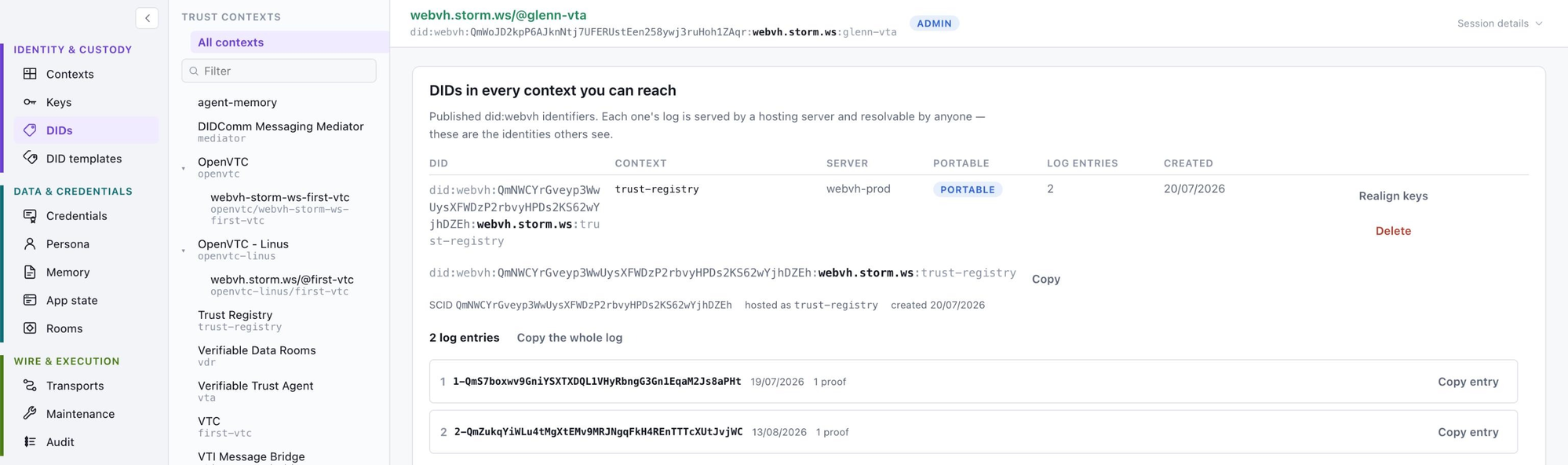
A did:webvh DID has a published document declaring its verification methods, and the agent has its own key records. They can drift, and they had drifted for Glenn. The fix is one trust task, vta/webvh/dids/realign-keys/1.0, which brings the key records back into agreement with the document.
Look at how the pane uses it. It calls the task twice. First with a dry-run flag, and shows the operator what would move, what is already aligned, and what does not match. Then, on confirmation, without the flag. The code comment on that pane says the dry run is not a courtesy, it is the diagnosis. Shipping a second, client-side copy of the comparison could disagree with the agent’s, so the client does not have one.
That is what “executing trust tasks on the fly” looks like in practice. The preview is not a client-side simulation. It is the same task, asked to report rather than act.
Why it matters: wildly different UX, same thing underneath
Once the agent holds every piece of state and every operation is a specified task, the front end stops being special. The Personal Network Manager command line, the OpenVTC terminal interface, the browser plugin, the installable web app, and the mobile agent are all the same thing. They send the same documents to the same agent and get the same answers. They are just wildly different UX.
This is what Glenn has wanted for a long time, and it is worth quoting his framing: it should be easy for any designer to create a custom skin without worrying about the backend. All the heavy lifting and messaging is already there. If you look at any part of the VTA management console and then go to the trust task registry, you will find the task that renders that screen. There are 386 specifications in the registry today, and the 77 under the vta/ namespace are the management UX integration in its entirety.
So nothing stops someone building a new lightweight UI against the trust task library. It does not need a backend. It does not need a data model. It needs a way to send a task and render the response. A design-a-thon for alternative front ends is a realistic thing to run, and the results would all be correct by construction, because none of them could hold a stale copy of anything.
The same pattern holds on the community side. The Verifiable Trust Community (VTC) service is built the same way, and its admin console goes a step further: third-party UI plugins can be dropped into a directory and appear in the navigation with no rebuild of the daemon or the shell.
What you give up
An honest post has to say what this costs.
Every screen is a round trip. There is no optimistic rendering and no offline mode, because there is nothing to render from when the agent is unreachable. The plugin mitigates this with a channel chain that prefers a direct transport and falls back through DIDComm and REST, and with a mediator for agents on private networks, but it cannot make the network go away.
The agent has to be good. All the complexity that a conventional design spreads across client and server is concentrated in one place. That is the point, and it is also a bet on that one place.
And the “no state” claim has the edges I described above. Keys, connection records, and site grants live on the device, because something has to sign the first task. The line is drawn at domain state, and it is drawn deliberately.
The point
For years the front end has been where applications live, and the back end has been where they store things. The VTA inverts that. The agent is where the application lives, and the front end is where it is looked at. Every click is a request the agent evaluates against its own policy, signs off on, and answers. Nothing is ever out of sync because there is only one copy. Nothing is ever stored elsewhere because there is nowhere else.
It was obvious in retrospect. It usually is.